Lesson 4: Your First Build
This is the main event. You're going to describe an app idea in plain English, and Claude Code will build it.
Time estimate: 30–45 minutes (mostly watching Claude Code work)
Step 1: Create your project folder
Open your terminal and run mkdir my-first-app then cd my-first-app:
mkdir my-first-app
cd my-first-app
Replace my-first-app with whatever you want to call your project. Building a golf tracker? Use golf-tracker. A recipe app? Use recipe-box. Pick a name that means something to you — lowercase, no spaces, hyphens instead of spaces. This is your project, name it yours.
These commands create a real folder on your computer — the same kind you'd create by right-clicking in Finder (Mac) or File Explorer (Windows) and choosing "New Folder." The terminal is just a faster way to do it.
Go check: Open Finder or File Explorer right now and navigate to your home folder. You should see your new folder sitting right there. Everything your app needs — code, images, configuration — will live inside this folder. When you eventually deploy your app, it's this folder that gets uploaded.
The second command, cd, tells the terminal "go inside that folder." From this point on, every command you run happens inside it.
Step 2: Start Claude Code in plan mode
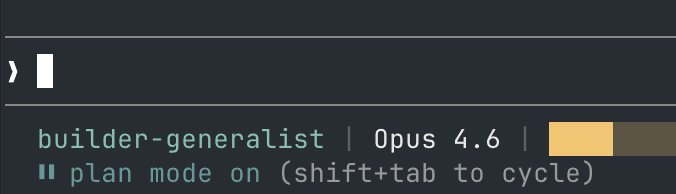
Run claude in your terminal to start a session. Once Claude Code is running, press Shift+Tab until you see plan mode at the bottom of the screen. It should look something like this:
Step 3: Describe your idea
Type (or speak) your idea in plain English. Don't overthink it. Just describe what you want as if you were telling a friend.
One important thing: tell Claude Code to use Next.js and Supabase. These are the tools we'll use throughout this course, so starting with them means everything you learn later will apply directly to your project.
- Next.js is a framework for building websites. Think of it as the engine that turns your code into pages people can visit in a browser.
- Supabase is your database and user system. It stores your data (users, posts, scores, whatever your app needs) and handles things like login and sign-up.
You don't need to understand how they work yet — Claude Code does. Just include them in your description so Claude Code picks the right tools.
Here's what a real first prompt looked like in our teaching session — a golf group management app:
I want to build an admin tool for a golf group using Next.js and Supabase. It's a website where we can save round results, track an annual tournament with monthly stops, manage monthly member payments, track fines for bad plays, and let members upload screenshots of their payment receipts. The group has about 25-50 members. Use Supabase for authentication and the database.
Your idea doesn't need to be this detailed. Even a few sentences work. Claude Code will ask follow-up questions.
Pick one that sounds interesting, copy the full prompt, and paste it into Claude Code. Or make up your own — just remember to include "using Next.js and Supabase."
Book club tracker:
I want to build a book club tracker using Next.js and Supabase. Members can create an account, log books they've read with a rating and short review, and browse what everyone else is reading. Each month, members can suggest a book for next month and vote on the suggestions — the one with the most votes wins. There's a dashboard that shows the current month's pick, a leaderboard of who's read the most books, and a history of all past picks. Use Supabase for authentication and the database. The group has about 10-20 members.
Expense splitter:
I want to build an expense splitter app using Next.js and Supabase. Friends can create a group, add shared expenses (like dinner, rent, or a trip), and the app calculates who owes who. Each expense has a description, amount, who paid, and how to split it (equally or custom amounts). There's a running balance so you can see at a glance who's owed money and who owes. Members can mark debts as settled. Use Supabase for authentication and the database. Designed for small groups of 2-10 people.
Workout log:
I want to build a workout log using Next.js and Supabase. Users create an account and log their workouts — each workout has a date, exercises, sets, reps, and weight. There's a dashboard that shows your recent workouts, personal records for each exercise, and a simple chart showing progress over time for any exercise you pick. Users can create custom exercises and organize them by muscle group. Use Supabase for authentication and the database.
Recipe box:
I want to build a recipe box app using Next.js and Supabase. Users can add recipes by typing them in or pasting a URL (the app should try to extract the recipe from the page). Each recipe has a title, ingredients, steps, prep time, and tags like "quick", "vegetarian", or "dessert". Users can search and filter their recipes, mark favorites, and plan their meals for the week by dragging recipes into a weekly calendar view. Use Supabase for authentication and the database.
Neighborhood board:
I want to build a neighborhood bulletin board using Next.js and Supabase. Residents create an account and can post announcements, events (with a date and location), items for sale, and service recommendations. Posts can have categories and a simple upvote system so the most relevant ones rise to the top. There's a feed view that shows everything chronologically and a filter to see just one category. Anyone can comment on posts. Use Supabase for authentication and the database. Designed for a neighborhood of 50-200 households.
Voice-to-text tip: You express yourself better when you speak naturally. Use your phone's dictation feature or a tool like Wispr Flow to speak your idea instead of typing it.
Step 4: Answer Claude Code's clarifying questions (if it asks)
Claude Code will often ask questions to narrow down the scope. Things like:
- How many users?
- Who has access? Just admins, or everyone?
- What features are must-haves vs. nice-to-haves?
- Any design preferences?
You'll see multiple-choice options. Pick the one that fits, or type your own answer if none of them work.
Sometimes Claude Code skips questions and goes straight to a plan. This happens when your description is specific enough that Claude Code feels confident about what to build. That's fine — just review the plan carefully in Step 5.
This back-and-forth is Claude Code doing its job. It's figuring out what to build so it doesn't build the wrong thing.
Step 5: Review the plan
Claude Code will present a structured plan. Read it. Look for:
- Tech stack — Is it using Next.js and Supabase? If it suggests something else, tell it: "Use Next.js for the frontend and Supabase for the database"
- Features — Does the feature list match what you described?
- Scope creep — Is it adding things you didn't ask for? If so, tell it to simplify
- Phases — Is the work broken into reasonable steps?
If something looks off, say so. "Don't use Firebase, use Supabase." "Remove the payment integration for now — just track payments manually." "That's too many features for a first version — cut it down to X, Y, and Z."
If the plan looks good, approve it.
Step 6: Watch Claude Code build
Once you approve the plan, switch out of plan mode (Shift+Tab back to default or auto-accept edits) and tell Claude Code to proceed. Auto-accept edits is a good choice here — Claude Code can write files freely but will still ask before running commands.
Claude Code will start creating files, writing code, and installing dependencies. You'll see it:
- Create the project structure
- Set up the database schema
- Build the UI components
- Wire everything together
It will ask for permission to run certain commands. For each one, you can:
- Yes — approve this one time
- Yes, and don't ask again — approve this type of command for the whole session
Claude Code is building my app but something went wrong during the build. It seems stuck or is showing errors. Here's what I see in the terminal: [paste the last few lines]. My app is supposed to be a [brief description]. Can you help me figure out what happened and what to tell Claude Code to fix it?
If you fully trust what Claude Code is about to do and don't want to approve every action, you can restart with claude --continue --dangerously-skip-permissions:
claude --continue --dangerously-skip-permissions
This tells Claude Code: "I trust you 100%. Don't ask me for permission on anything. Just go."
With this flag, you could literally go to lunch and come back to a built app. But use it only when you trust the plan — you're giving Claude Code full control.
Do not use this flag on projects with sensitive data or production code. It's great for greenfield projects and learning. It's dangerous on anything you care about preserving.
Step 7: See your app
When Claude Code finishes building, ask it to start the development server. Or run npm run dev yourself:
npm run dev
Open the URL it gives you — typically http://localhost:3000 — in your browser.
There it is. Your app. Running. Built from a description in plain English.
I used Claude Code to build an app but I'm running into an issue when I try to run it. The command I ran was [npm run dev / the command Claude Code told me to use]. The error I see in the terminal is: [paste the error]. The app was supposed to be a [brief description of your app]. Can you help me figure out what went wrong?
It won't be perfect. It might have rough edges, placeholder text, or missing features. That's fine. The point is:
You described an idea. An AI agent built it. You're looking at a working application.
Everything from here is iteration. "Move this button." "Change the color." "Add a search bar." That's what the rest of this program teaches you.
You just built an app
Take a moment to appreciate what just happened. You:
- Opened a terminal for (maybe) the first time
- Installed a tool using a command-line package manager
- Described an app in plain English
- Reviewed and approved an architecture plan
- Watched an AI agent write a full-stack application
- Saw it running in your browser
A year ago, this would have taken a team of developers weeks. You did it in an afternoon.
Checkpoint
You're ready for the next lesson if:
- You have a project folder with code in it
- Your app runs locally in the browser
- You understand the workflow: describe → plan → review → build → run